|
Photos as Available
|
Step
|
Actions and Comments
|
|
|
1
|
Stage next set of full
blocks
|
|
|
2
|
Stage next set of full
coupler blocks
|
|
|
3
|
Make sure blocks and
couplers are clean and ready for insertion
|
|
|
4
|
Stage empty block racks and
coupler block racks for removal
|
|
|
5
|
Stage full cooling plug box
for mounting
|
|
|
6
|
Insure incoming cooling
plug is clean and prepped
|
|
|
7
|
Stage box for removal
cooling plug
|
|
|
8
|
Stage mold block removal
stand
|
|
|
9
|
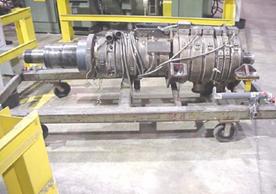
Stage empty die stand and
flare boxes (if applicable)
|
|
|
10
|
Stage incoming die and full
flare boxes
|
|
|
11
|
Insure incoming die is
preheated to300-350 degrees and that all sensors and elements have been
tested and are working
|
|
|
12
|
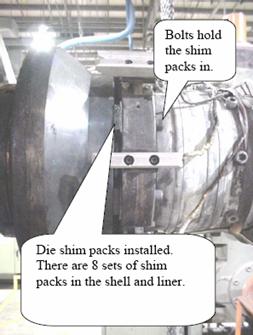
Insure die flare gaps have
been set per Run History Log or the 3020 Process Control Plan.
|
|
|
13
|
Stage water bath inserts
|
|
|
14
|
Stage cut-off fixture and
router
|
|
|
15
|
Stage Propane tanks and
insure they are full
|
|
|
16
|
Stage fire extinguishers
and insure they are operational
|
|
|
17
|
Check assigned forklift –
insure propane tank is full and equipment is fully operational
|
|
|
18
|
Stage and set-up brander
(if applicable)
|
|
|
19
|
Stage production supplies
for next run (gaskets, etc.)
|
|
|
20
|
Insure material mix and
availability for next run.
|
|
|
21
|
Stage equipment to empty
and fill hoppers as necessary
|
|
|
22
|
Insure proper tools are staged for this
size including (dead blow hammer, gloves, Allen pack, and 3/4" wrench
for punches. pipe wrench, 1/2-7/16-3/4” wrenches, screw driver, brass putty
knife, ratchets, sockets, long extension, 18” crescent wrench, Porta Power or
puller and brackets, spanner wrench, shim packs, bolts, silicon, pry bars,
die grinder with brass wire wheel, copper gauze, and sand paper)
|
|
|
23
|
Insure mechanical settings
guide is available
|
|
|
24
|
Insure ladders, platforms,
etc. are clean and ready for use.
|
|
|
25
|
Check lifting mechanisms
(cranes and slings) to insure they are safe and in working order
|
|
|
26
|
Set up any caution pylons
or restricted areas as needed
|
|
|
27
|
Meet with changeover team
to insure everyone knows their roles and responsibilities
|
|
|
28
|
Initiate shut down
procedure on current product.
|
|
Photos as Available
|
Step
|
Actions and Comments
|
|
|
1
|
Initiate Shutdown Procedure
including appropriate safety guarding and lock-outs
|
|
|
Die Swap
Removal/installation
|
|
|
1
|
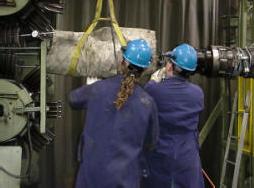
Disconnect and remove plug
lines.
|
|
|
2
|
Clean and remove the
cooling plug
|
|
|
3
|
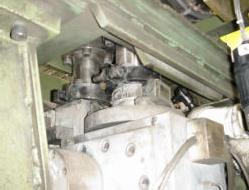
Remove and clean the tower
collars and clean the die adapter tubes
|
|
|
4
|
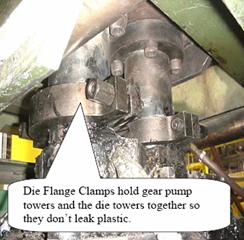
Disconnect turbine hoses,
air lines, die sensors, thermo couple wires and die heat electrical
connections
|
|
|
5
|
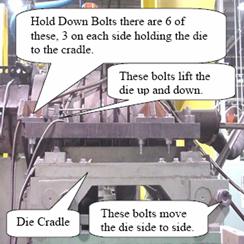
Raise the die to clear the
stand and clean the tooling on the die and Normag/LCI towers and Die feed
tubes
|
|
|
6
|
Lower the die onto the cart and tuck
away the die heat plugs to prevent damage.
|
|
|
7
|
Remove the new die from the pre -heat
station and bring it to the changeover location.
|
|
|
8
|
Coat the pump and towers with Blue Moly
anti-seize compound.
|
|
|
9
|
Raise the die to clear the stand, coat
the feed tubes with Blue Moly anti-seize compound and guide it into place
using two or more bolts for alignment.
|
|
|
10
|
Bolt the die down, ensuring that the
pump towers fit snugly into the die adapter tubes.
|
|
|
11
|
Coat the tower collars with Blue Moly
anti-seize compound and install
|
|
|
12
|
Connect the thermocouples and heat plugs
and wind the lines through the die stand to clear the corrugator.
|
|
|
13
|
Apply silicone around the die nut, or
install new o-ring if the old one is damaged
|
|
|
14
|
Install the cooling plug, ensuring the
stamp “Top” is on top.
|
|
|
15
|
Apply silicone to the down-stream end of
the cooling plug, sealing it to the mounting mandrel
|
|
|
16
|
Connect the chiller lines, vacuum tube,
and internal punch lines. Smear liberal amounts of caulking around the bolts
and the seam of the plug shaft
|
|
|
Flare Swap (Removal/Installation)
|
|
|
1
|
Turn the Chiller off 30
seconds before shutdown. Refer to the shut down procedures.
|
|
|
2
|
Remove the lines from the center of the
die (coolant lines, vacuum lines, internal spray lines, etc).
|
|
|
3
|
Disconnect the turbine
hose.
|
|
|
4
|
Remove the cooling plug as
quickly as possible. Store in the appropriate box with the mounting pin and
bolts, and then set aside.
|
|
|
5
|
When removing die parts and
related tooling, clean the plastic from all surfaces quickly while it’s hot.
|
|
|
6
|
Use the die flare removal
fixtures and an overhead crane to assist on handling 15 through 30 flares.
No flame will be needed if the flare removal begins immediately.
|
|
|
7
|
Remove the die flare nut.
|
|
|
8
|
Heat the inner and outer liner flares
evenly on all sides with a propane torch to thoroughly soften the plastic and
expand the flares (5 to 20 minutes, depending on the starting temperature of
the die). Refer to the flare heating procedures.
|
|
|
9
|
Using the Porta-Power and fixtures, remove
the inside liner flare. Un-bolt and remove the outside liner flare. Clean
all parts thoroughly after removal while they are still hot. Place in the
box and set aside.
|
|
|
10
|
Remove the liner die centering the
bolts.
|
|
|
11
|
Remove the split collar.
|
|
|
12
|
Remove the inside shell flare. Clean it
while it’s hot; place it in the box and set aside.
|
|
|
13
|
Disconnect the die sensor wires. In 8”,
10”, or 15”, the sensors are to be removed.
|
|
|
14
|
Remove the outside shell flares. Clean them while
they are hot. Place them in the box and set aside. Have the appropriate
shims ready. Apply anti-seize compound to the die surface and all bolt
threads.
|
|
|
15
|
With a clean flare on the lifting
bracket and hoist, heat to approximately 100o above the die
temperature. Refer to the flare heating procedures.
|
|
|
16
|
Guide the flare onto the die and install
the shims and bolts. Connect die sensor wires.
|
|
|
17
|
Heat the inner shell flare and install
onto the die.
|
|
|
18
|
When the inner shell flare is installed,
immediately install the split collar and key (inner shell flare has to still
be hot enough to turn on the die to line the collar up with the key).
|
|
|
19
|
Follow steps 2 and 3 with liner flares
and screw on the die nut. Ensure the drain slot o n the inner liner flare
goes on the bottom.
|
|
|
20
|
Apply Silicone or o-ring to the die nut
and install the plug, chiller lines, vacuum hose, and internal punch line.
Ensure the stamp “Top” is on top.
|
|
|
Blocks Removal and Installation
|
|
|
1
|
Remove the mold blocks in order, leaving the coupler
blocks in place. Set each rack aside.
|
|
|
2
|
Remove the coupler blocks, marking the
carriers t hey came from. Set the rack aside.
|
|
|
3
|
Block Installation (If you run HI -Q, disregard step
1 and refer to the carrier installation procedure) (Refer to 3020 shared tooling
requirements and the 3020 mold block sets and step procedures in the 3020
support manual.)
|
|
|
4
|
Install the coupler blocks in the marked carriers
with the gaskets facing upstream. B. Install the timing wheel and set the
external punches.
|
|
|
5
|
Rotate the corrugator to check for
proper installation. Ensure that when the corrugator closes, large pins will
not be forced into little holes.
|
|
|
6
|
Align the corrugator as described in the
process set up procedures.
|
|
|
Downstream Changes
|
|
|
1
|
Remove the guide bars between the water baths and
support bars inside baths. Set them aside.
|
|
|
2
|
Un-bolt and remove the bath inserts and
set them aside. Do not remove them from the area at this time. C. Install
the new inserts and bolt them in.
|
|
|
3
|
Re-install the support bars in the water baths and
the guide bars between the water baths
|
|
|
4
|
Install the skiver. Refer to the skiver
installation procedures.
|
|
|
5
|
Adjust the troughs to the new pipe
diameter, including the skiver trough.
|
|
|
6
|
Install the new jig on the router for
the proper diameter.
|
|
|
7
|
Raise the cage wheels if you are not
running single wall. If you will run single wall, install the cage wheels at
this time.
|
|
|
Corrugator and Die alignment
|
|
|
1
|
Check the die sensors for proper operation.
|
|
|
2
|
Bring the corrugator in; watch the clearance of the
corrugator to the plug and die.
|
|
|
3
|
Set travel forward limit switch.
|
|
|
4
|
Set backstops - ½ turn lose from running
position.
|
|
|
5
|
Limit switch on PLC screen; it should change colors
(blue to pink).
|
|
|
6
|
Raise the corrugator until the bottom sensor lights
up.
|
|
|
7
|
Move the corrugator down until the
bottom sensor turns off. Set the dial indicator to zero.
|
|
|
8
|
Close the mold blocks.
|
|
|
9
|
Move the die center down until the top
sensor goes off (watch the revolution of the dial indicator).
|
|
|
10
|
Move the corrugator up half of the
revolution you watched on the dial indicator.
|
|
|
11
|
Open the mold blocks at
least 1.5”
|
|
|
12
|
Drop the corrugator .100”
|
|
|
13
|
Back the corrugator out, checking all
clearances around the die and plug.
|
|
Photos as Available
|
Step
|
Actions and Comments
|
|
|
|
Set-up For In-Line Couplers
|
|
|
1
|
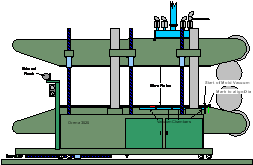
Make sure there is a mark
on the bottom beam of the corrugator where the mold vacuum starts.
This can be done by removing one of the bottom mold blocks, run the
corrugator at a slow speed, look through the slots in the carrier and stop
the corrugator when you see a hole in the wear plate. Lay a straight edge
along the holes and make the mark on the bottom beam (actually the run in).
Make the mark permanent; use a center punch to make a line of 3 or 4 punch
marks.
|
|
|
2
|
Make a second mark 5” to 5
¼” upstream from the “vacuum start mark”. This mark will be used to set the
corrugator position. Move the corrugator over the die until the shell flare
opening lines up with the second mark.
|
|
|
3
|
With the mold blocks
installed, start and run the corrugator. Make sure the timing wheel and the
corrugator controls are set for the product to be run. Turn on the “In-Line
Coupler” switch.
|
|
|
4
|
Hold the “Pierce Punch Set”
button in, release the button so the punch will start on the first
corrugation after the gasket corrugation. It is very important to do this
step before you proceed to the next steps. When the set button is released,
it sets the coupler counts at 0. All the count numbers you will be entering
into the “Coupler Counts” screen use this as the starting point.
|
|
|
5
|
Go to the “Coupler Counts”
screen (for Panel view lines).
|
|
|
6
|
On the “Coupler Counts”
screen, notice the numbers counting up in the upper right hand corner. One is
counting for the coupler counts, 1 count = .1”. The other count is counting
pierce counts; this is the lesser number and should be ignored.
|
|
|
7
|
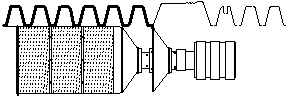
When the position of the
mold blocks (seen in following) is at the mark on the corrugator to align the
die, write down the count (number) for each:
|
|
|
8
|
The root at the start of
the coupler (Coupler Air Start). This will switch the Photohelic to
the low needle to form the coupler at a lower air pressure (½” to 1 ½ inches
of water).
|
|

|
9
|
The root at the end or the
coupler (Coupler Air Stop). This will switch the Photohelic back to
the high needle to properly form the pipe (2 ½” to 3 ½ inches of water).
|
|
|
10
|
When the center of the
coupler reaches the end of the cooling plug (Liner Pierce). This will
relieve the vacuum, created from cooling, in the coupler. Without this the
coupler will be collapsed when it exits the corrugator.
|
|
|
11
|
If you are running a
In-Line Coupler product, sizes 10” thru 18”, you will need to complete
the following:
|
|
|
12
|
The root at the start of
the gasket corrugation (Pump-Modulation Start). This is used on 10”
thru 18” to make the gasket corrugation thicker so it will support the
gasket. It does this by slowing the corrugator and liner pump down so there
will be more plastic put into the crown.
|
|

|
13
|
The root at the end of the
gasket corrugation (Pump-Modulation Stop). If this count is too long,
there will be excess plastic in the root just after the gasket corrugation,
which may cause the liner to “suck in”.
|
|
|
14
|
Now you can enter the
counts into the Coupler Counts screen. Use the Up and Down function to
highlight PASSWORD, enter 8338. Continue to use the Up and Down
function and enter the counts you collected.
|
|
|
15
|
If you are running a size
from 10” to 18”, you will need to enter a modulation % for the
corrugator and liner. A value of 85% or 90% usually works well.
This will slow the corrugator and liner pump down 10% to 15%. This will put
10% to 15% more plastic in the crown of the gasket corrugation. Next turn on
the Corrugator and Liner Modulation buttons.
|
|
|
|
Ways to collect the
Coupler Counts While The Line Is Running
|
|
|
1
|
The coupler counts can be
collected, entered or changed when the line is running. As long as the die is
aligned with the mark on the corrugator, 5” to 5 ¼” from vacuum, you can
watch the Photohelic change from the high needle to the low needle and back
to the high needle while watching the coupler mold blocks go by the mark on
the corrugator.
|
|
|
2
|
Another way to collect the
counts while the line is running is to calculate them. Use the root at the
start of the coupler (Coupler Air Start) to calculate the rest from. We know
every count is .1”, so every inch is equal to 10 counts. Use a tape measure
to measure the coupler. If the coupler is 10” long, add 100 counts to the
Coupler Air Start to get the Coupler Air Stop. Another thing that helps is to
know how many counts are in each corrugation.
10” = 17 counts per corrugation
12” = 20 counts per
corrugation
15” = 24 counts per
corrugation
18” = 30 counts per
corrugation
24” & 30” = 40 counts
per corrugation
Important Note:
If the corrugator is
moved up-stream or downstream, the coupler counts will need to be changed to
the new Die/Corrugator relationship
|
|
|
|
|
|
|
Start up for panel view
lines
|
|
|
1.
|
Insure that all heat zones
are up to temperature on the extruder and die zones
|
|
|
2.
|
Remove the heat blanket
from the die
|
|
|
3.
|
Heat the die evenly until
it has been heated enough for the plastic to flow freely from the flares
Suggested heat times:
10” heat for 10 ( or – 3)
minutes with 2 torches
12” heat for 12 ( or – 3)
minutes with 2 torches
15” heat for 15 ( or – 3)
minutes with 2 torches
18” heat for 18 ( or – 3)
minutes with 2 torches
24” heat for 22 ( or – 3)
minutes with 2 torches
30” heat for 32 ( or – 3)
minutes with 2 torches
Spray cooling plug with
mold release to prevent the molten plastic from sticking to the cooling plug
|
|
|
4.
|
Spray mold release on the
flares and split collar
|
|
|
5.
|
Purge die keeping a close
eye on the discharge pressures and the extruder drive amps until molten
plastic flows freely
|
|
|
6.
|
Bridge the flares with a
piece of cardboard on 18”, 24” and 30” to help keep the plastic from falling
between the flares
|
|
|
7.
|
Have historical operator’s
log available for the previous run for the diameter you are starting up on
|
|
|
8.
|
Move the corrugator
upstream over the die, making sure someone is watching the clearance between
the plug and the blocks. Move the corrugator upstream until it stops
|
|
|
9.
|
Position the crown section
of the mold block ¾ of the way over the shell flare
|
|
|
10.
|
Bring the corrugator up
.100 on 12” through 30” and .200 on 8” and 10”
|
|
|
11.
|
Close the top mold blocks
|
|
|
12.
|
Turn ON the corrugator
start control
|
|
|
13.
|
Turn the boost air
approximately ½ to ¾ of the way open depending on the diameter of pipe that
you are running
|
|
|
14.
|
Go to the Motors screen and
turn on the liner pump, shell pump and the extruder
|
|
|
15.
|
Bring the liner and shell
pumps up to about 5% of the running speed
|
|
|
16.
|
Bring the extruder set
point up to approximately 1000 PSI, once the extruder reaches the 1000 PSI
push the button to change the controls from manual to automatic
|
|
|
17.
|
Once you are in the
automatic mode you can start ramping the liner and shell pumps up towards
running speed
|
|
|
18.
|
Listen for the boost air
sound to decrease and eventually disappear, when you no longer can hear boost
air you are ready to start the corrugator
|
|
|
19.
|
Start the corrugator moving
by turning up the speed control for the corrugator, only take the speed up to
25% to 50% until you have achieved a bounce
|
|
|
20.
|
As the blocks move over the
flares it will carry the shell plastic to the liner plastic and seal the two
together, at this time your manometer should be moving with a positive
bounce. Note: It is very important to reduce the amount of boost air as the
shell and liner come together to keep the boost air from blowing the shell
out. Once you have established a bounce the boost air should be turned off
completely
|
|
|
21.
|
Always remember to switch
from process air to nitrogen after you have achieved a bounce
|
|
|
22.
|
Once a bounce has been
established you can finish bringing you shell and liner pumps up to running
speed by touching the resume all button
|
|
|
23.
|
Turn on the cooling plug
and vacuum pumps. Note: Vacuum chamber 1 is always on and vacuum chambers 2,3
and 4 should be turned on in sequence as the pipe moves through the
corrugator
|
|
|
24.
|
Turn on the air turbine,
the air manifold, the top and bottom blowers, the fault switch, the pierce
punch, and the blowers for cooling bath 1 and 2 (if applicable)
|
|
|
25.
|
Position someone to watch
the start up end of the pipe as it approaches the first water bath to insure
it makes it into the bath without catching on the insert
|
|
|
26.
|
For in-line pipe you must
rest the pierce punch for the coupler to insure the internal and external
pierce punches are punching in the proper locations. This is extremely
important to the forming of the bell and spigot.
|
|
|
27.
|
Inspect the inside of the
pipe visually, make any necessary adjustments for areas where the liner and
shell may not be bonding causing a bubble on the inside of the pipe
|
|
|
28.
|
Cut an inspection hole in
the pipe in the first cooling bath to check root center and to get an idea of
the shell and liner thickness
|
|
|
29.
|
Once the pipe is through
the first cooling bath the lid should be closed and the water turned on
|
|
|
30.
|
Have someone walk with the
start up end of the pipe all the way down to the packagers station to insure
it does not get jammed on anything
|
|
|
31.
|
At this point you are ready
to cut a sample and check all of the specifications required for the first
piece verification approval and any necessary adjustments
|
|
|
Shut Down procedures for
panel view lines
|
|
|
1.
|
Before shutting down insure
all settings have been written down and saved on the resume settings
|
|
|
2.
|
Turn off the chiller
|
|
|
3.
|
Turn off the extruder
|
|
|
4.
|
Turn off the Melt Pumps
|
|
|
5.
|
Turn off the photohelic if
it is being used
|
|
|
6.
|
Turn off the fault switch
for the corrugator
Note: If you are running
single wall pipe you will need to turn off the internal spray and the steam
removal blower at the same time
|
|
|
7.
|
Turn off the vacuum pumps
and close all the chambers
|
|
|
8.
|
Turn off all blowers and
the air turbine
|
|
|
9.
|
Turn off the water supply
to the cooling baths
|
|
|
10.
|
Stop the corrugator
|
|
|
11.
|
Raise the top mold blocks
approximately 2”
|
|
|
12.
|
Lower the corrugator .100
on 12” through 30” and .200 on 8” and 10”
|
|
|
13.
|
Note: If running single
wall you will have to run the corrugator and clear the line of pipe before
moving the corrugator off the die
|
|
|
14.
|
Begin moving the corrugator
downstream off the die and cooling plug. Note: You should always have someone
watching the clearance between the mold blocks and the cooling plug as you
move the corrugator back
|
|
|
15.
|
Once the corrugator is all
the way back you can know safely restart the corrugator and run the remaining
pipe out of the corrugator and push it downstream
|
|
|
16.
|
All excess plastic should
be cleared from the flares and the die covered with a heat blanket and
properly secured
|
|
|
17.
|
Once the pipe has cleared
the cage wheels at the packagers station (if applicable) you can push the
corrugator stop button
|
|
|
Start up procedures for
analog lines
|
|
|
1.
|
Spray the die flares and
plug liberally with mold release (silicone spray). Spray only those
components that will be exposed to material flow
|
|
|
2.
|
Bridge the die between the flares
with cardboard on 24” and 30”. Cardboard should be 1 1/2 feet long or enough
to wrap around half the circumference of the flare. Secure with twine using a
slipknot.
|
|
|
3.
|
Position the corrugator
over the die. Move the corrugator upstream with caution, checking the
clearance between the mold blocks and the cooling plug
|
|
|
4.
|
Ensure that the vacuum
chamber valves are closed. (The first chamber is always open, however).
Vacuum pumps should be turned off.
|
|
|
5.
|
Raise the corrugator .100,
assuming it was lowered .100 before it was backed off the die
|
|
|
6.
|
Close the mold blocks. On
the initial start up watch only those blocks between the corrugator columns
|
|
|
7.
|
Test the corrugator for
start up. Place the corrugator speed pot at zero, but leave the corrugator drive
on
|
|
|
8.
|
Position the crown section
of a block even with the shell die flare. It may be necessary on larger
sizes, particularly 30” to position the shell flare closer to the downstream
corrugation wall
|
|
|
9.
|
Ensure the corrugator fault
switch is off
|
|
|
10.
|
Leave the auto die
centering switch in the manual position while producing dual wall product
|
|
|
11.
|
Turn shop air on, nitrogen
off. Turn on boost air and open the pre blow valve to half way
|
|
|
12.
|
Start the extruder using
operator log from the previous run for the size being produced. Note: Dual
extruder lines: Start shell extruder first, than the liner extruder
|
|
|
13.
|
Start the corrugator using
the operator log from the previous run for the size being produced. On 30”,
for a positive pressure on the manometer start the extruder first than the
corrugator
|
|
|
14.
|
Adjust the internal air
(boost) pressure. Purpose: to supply even pressure in the chamber of each
corrugation
|
|
|
15.
|
Open and close the pre blow
valve as necessary to maintain a positive internal die pressure of 3” to 4”
on the manometer until a normal bounce is achieved by the photohelic boost
and/or gas regulator
|
|
|
16.
|
Adjust the regulated
pressure as necessary to achieve a fairly consistent bounce on the manometer.
Watch the manometer. Once you have the bounce-established switch to shop air
over nitrogen. A consistent bounce shows that the shell is bonding. If
bonding cannot be achieved look into the downstream end of the pipe for a
bubble. Adjust to center if necessary.
|
|
|
17.
|
Slowly turn on vacuum pumps.
Watch the bounce to make sure it stays positive. If you lose it, turn the off
the vacuum pumps and turn on the pre blow air again until bounce is
reestablished. Then turn on vacuum pumps again.
|
|
|
18.
|
Open vacuum chamber 2 until
it is stable, then vacuum chamber 3 until stable, then open 4and 5 (if
applicable)
|
|
|
19.
|
Check Photohelic and adjust
if needed. Also check the air to establish a good bounce on the manometer
(i.e. 2 - 4” on smaller sizes, up to 11” on 10” diameter products. Too little
pressure causes corrugations to collapse, suck ins (liner and shell), and
poor liner flatness. Too much pressure causes good shell appearance, but poor
distribution of shell material, hot spots in the root area or a thin crown
area.
|
|
|
20.
|
Turn on the air turbine, water
baths 1 and 2, top and bottom blowers and the fault switch
|
|
|
21.
|
Have associate help you get
the pipe through the first cooling bath. Note: When running in line bells
reset the pierce punch to skip the coupler
|
|
|
22.
|
Turn on the pierce punch
|
|
|
23.
|
Cut a hole in the pipe when
it gets into the water bath, with a micrometer check the root centering,
crown and liner thickness, adjust as necessary. Also check for liner bonding.
|
|
|
24.
|
Close the lid on the water
bath and turn on the water
|
|
|
25.
|
Have associate walk with
the start up end all the way down to the packer station to insure it does not
get jammed on anything
|
|
|
26.
|
At this point you are ready
to cut a sample and check all specifications required for the first piece
verification approval.
|
|
|
Single Wall Start up
procedure for analog line
|
|
|
1.
|
Pull the spray rod upstream
so that the spray nozzles are inside the die if possible
|
|
|
2.
|
Spray the die liberally
with mold release Silicone spray). Spray only those parts exposed to material
flow
|
|
|
3.
|
Position the corrugator
over the die. Move the corrugator upstream with caution, checking the
clearance between the mold blocks and the die flares
|
|
|
4.
|
Close the mold blocks until
all blocks are closed. On initial start up watch only those blocks between
the corrugator columns
|
|
|
5.
|
Position the crown section
of the block adjacent to the shell die flare
|
|
|
6.
|
Test the corrugator for
start up: place the corrugator speed pot at zero, but leave the corrugator
drive on.
|
|
|
7.
|
Make sure the corrugator
fault switch is off
|
|
|
8.
|
Turn the vacuum pumps on
(the first chamber is always open- have all other chambers closed
|
|
|
9.
|
Turn the pre blow (die
internal air) valve on. (Do not use nitrogen on single wall products)
|
|
|
10.
|
Start the extruder to the
most current running log. Use only the main extruder on a dual extruder line
|
|
|
11.
|
Start the corrugator. On
24”, wait approximately 30 seconds after starting extruder to start the
corrugator. On other sizes, the time frame to wait is graduated down to just
a few seconds on 12” It is sometimes helpful to use the pre blow to assist in
blowing the plastic out against the blocks to initiate the vacuum seal. The
air supply may be wide open for the larger sizes and graduated down for
smaller sizes. Caution: Be sure to turn the pre blow off after achieving
adequate vacuum and forming. If left on it will cool the die and cause
unusual die center readings
|
|
|
12.
|
Open vacuum chambers
slowly, allowing each chamber to achieve 15” of vacuum before turning on the
next chamber
|
|
|
13.
|
Turn the corrugator fault
switch on
|
|
|
14.
|
Feed the pipe through the
water bath
|
|
|
15.
|
Turn on the internal water
spray
|
|
|
16.
|
After the pipe is through
the first set of cage wheels turn the phase shifter to bring the pipe into
pitch using the pitch gage. Caution: on smaller diameters be careful
not to over stretch the pipe
|
|
|
17.
|
Turn on water baths and
blowers
|
|
|
18.
|
Turn on the corrugator
cooling blowers only after allowing the mold blocks to warm sufficiently for
proper forming.
|
|
|
19.
|
Have associate walk with
start up end all the way to the packaging station to insure it doesn’t get
jammed on anything
|
|
|
20.
|
At this point you are ready
to cut a sample and check all specifications required for the first piece
verification approval
|
|
|
Shut Down procedure for
analog lines
|
|
|
1.
|
Turn off chiller
|
|
|
2.
|
Turn main and or satellite
extruder off
|
|
|
3.
|
Set shell pump and extruder
to zero
|
|
|
4.
|
Turn Photohelic off (if
applicable)
|
|
|
5.
|
Turn off vacuum pumps and
close vacuum chambers
|
|
|
6.
|
Turn off pierce punch if
used
|
|
|
7.
|
Turn off all blowers
|
|
|
8.
|
Turn off water supply to
water baths, open lids
|
|
|
9.
|
Assist packaging associate
with the clearing of the line
|
|
|
10.
|
Once pipe has cleared all
cage wheels, shut corrugator off
|
|
|
11.
|
Turn off fault switch
|
|
|
12.
|
Open mold blocks 2”
|
|
|
13.
|
Lower corrugator .100 for
12” through 30”, .200 for 8”and 10”
|
|
|
14.
|
Move corrugator back while
checking for clearance between plug and mold blocks until traverse reverse
limit switch is activated
|
|
|
15.
|
Clean plastic from die
flares
|
|
|
16.
|
Cover die with heat blanket
and properly secure
|
|
|
17.
|
Check mold blocks for
plastic
|